Overview
Excel is a common habit for many procurement teams. It has become a part of how work gets done because of familiarity, inexpensiveness, and flexibility. Buyers, managers, and IT teams know how to use the spreadsheet. This convenience has made Excel procurement difficult to replace.
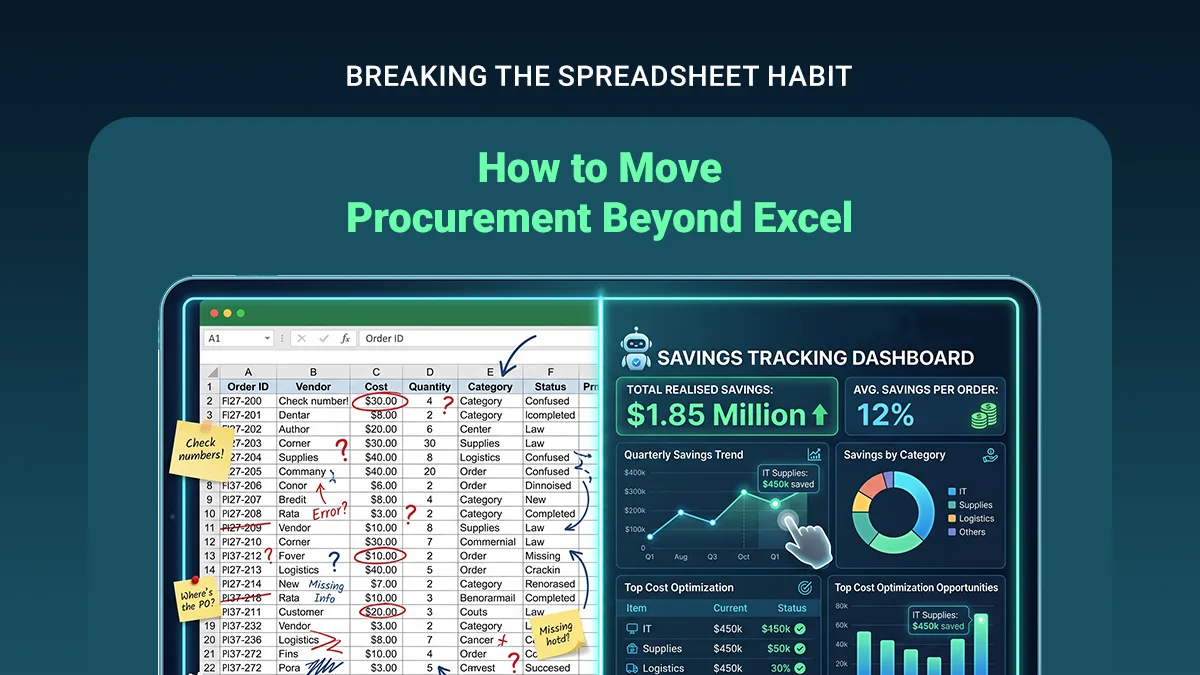
These days, however, procurement teams tend to connect requisitions, supplier information, approvals, pricing, and reporting in a single place. This makes the use of a procurement spreadsheet cumbersome and leads to a silent issue known as Excel Shadow IT.
This situation refers to creating and maintaining their own technology layers by various teams. It is because the official systems do not meet their requirements fully. Companies want to move beyond Excel to remove the friction and get rid of different technology usage.
This post talks about the role of procurement software in taking the process beyond spreadsheets. Let’s start with the real cost of Excel Shadow IT.
Excel Shadow IT- How It Is Costly for the Organization
It is fair to say that Excel Shadow IT does not indicate any wrongdoing. Employees use it to solve their legitimate business problems in many instances. For example, the organization’s existing ERP handles purchase orders well but remains inefficient in collecting requisitions.
In this situation, employees may create spreadsheets to monitor requests before entering them into the ERP. Procurement teams may maintain separate trackers to access supplier data. Managers may use spreadsheets to monitor pending approvals.
This type of workflow becomes permanent over time. The organization has to deal with multiple versions of procurement data. In other words, various spreadsheets have different data. This fragmentation affects procurement visibility badly. The procurement team struggles to get the relevant data.
Excel Shadow IT, in a way, leads to a lack of a reliable workflow to get the necessary data.
Procurement Software- How It Removes Friction
Procurement teams have seen enterprise-grade systems that require extensive configuration, lengthy implementations, and specialized administrators. When a new system or solution becomes harder to use than procurement spreadsheets, employees tend to continue with Excel.
Procurement Ops and IT leads may understand the limitations of spreadsheets but hesitate to undertake a transformation initiative. They should ask themselves this question: “How do we make the structured procurement process easier than using a spreadsheet?” The answer remains in the right procurement software.
This choice and strategy, however, need some factors to be considered.
Consumerized UX and Procurement Resistance
Consumer applications have changed the perception of users for business software. Intuitive interfaces, guided workflows, notifications, dashboards, and simple actions attract more users. These applications are free from any technical complexity. Procurement systems follow the same principle.
Advanced procurement management software can make common activities straightforward for the team. Employees can submit a purchase request through a simple form, and the system can collect the necessary information automatically. The approver receives requests and makes decisions.
Procurement teams can see pending work from a central dashboard. They can also check the supplier information within the relevant workflow. It is convenient to track sourcing activities for the company without making separate files. Here, a consumerized UI increases adoption and reduces resistance.
The objective here is to make the workflow familiar while using the procurement system.
Importance of Procurement Workflow over Technology
Procurement digitization needs a proper understanding of the way the work happens. Companies should map their existing process from request to payment before selecting procurement automation software.
It is better to identify the points where employees tend to leave the formal system and switch to spreadsheets, email, etc. These points can be any of the following-
Difficulty in submitting purchase requests
Lack of clarity in approval status
Necessity of manual formatting in supplier comparisons
Issues in accessing historical pricing
Requirement of exporting data into Excel for reporting
Each of these problems needs a different solution. A connected procurement workflow can assist team members in avoiding these issues.
Need to Replace Manual Purchasing
A purchase requisition is one of the most important starting points for procurement. When employees initiate manual purchasing, they may either send an email or create a spreadsheet containing information about the items.
The procurement team can review the request, check the accuracy, determine the proper approval process, and follow up with the requester. Purchase requisition software can manage this entire process effectively. It automates the process and ensures consistency.
The automated procurement management system helps teams complete their tasks and replace manual processes.
Automation of Approval Process
An automated approval workflow can transfer the request to the appropriate stakeholders. For example, a low-value purchase might need departmental approval, while a high-value purchase could require both procurement and finance approval.
The entire workflow can apply these rules consistently through automation. This results in a clearer audit trail and improves procurement visibility. It also reduces the number of procurement team-specific emails. IT Leads can leverage the advantage of automation in managing workflow rules.
How to Turn Procurement Data Into an Operational Asset
A spreadsheet can store data efficiently. It is, however, less effective at creating a reliable environment for organizational data. Procurement data management becomes complicated when supplier names differ between spreadsheets and manual price entries occur.
In other words, when multiple people maintain multiple files, it results in inconsistencies in categories and scattered historical information. Procurement software can establish a central data structure by supporting-
Purchase order history
Supplier records
Centralized requisitions
Approval records
Sourcing information
Spend categorization
Supplier performance data
Procurement reporting
It is, however, fair to say that teams can always face situations where exporting data to Excel is convenient.
Metrics to Measure the Change Beyond Excel
Procurement teams and IT Leads can track various metrics, including
Requisition-to-order cycle time
Approval turnaround time
Percentage of purchases following approved workflows
Manual data-entry volume
Duplicate supplier records
Procurement team workload
Off-contract purchasing
Spend visibility
User adoption
Number of procurement requests digitally handled
These metrics show whether digital procurement works well in the organization.
For example, if employees use spreadsheets only for analysis once transactions are recorded in the procurement platform, it is not a failure. Here, the important change is that transactional data follows a controlled workflow.
Procurement Digitization is the Future
Successful procurement digitization should focus on reducing friction. Procurement teams will not resist tools if they do not interrupt established routines or make familiar tasks harder. Modern procurement software can handle tasks and preset routines effectively.
The next generation of procurement systems should offer more familiarity, accessibility, and flexibility like that of Excel. When these systems offer more visibility, better workflow control, and centralized information, they will certainly reduce the usage of spreadsheets in future-ready enterprises.